SYNDRA
A management bot and web dashboard for Discord servers. Moderation, support tickets, announcements, tiered permissions and analytics, all run from a single panel. Live since September 2026.
Technologies
September–November 2026 · How SYNDRA began and developed. I started building SYNDRA to bring the maintenance and management of the bots on my own Discord server together. The web dashboard grew alongside the bot, and requests to use it on other servers made both parts of a commercial product.
1. Why did I start building my own bot?
On my own Discord server, I needed a separate bot for every job. Over time, the number reached about 15; keeping track of which bot did what, and how to manage it, became a task in itself.
Each had its own interface and way of working. I managed some through a web dashboard and others through Discord commands; their commands and permissions also clashed with one another.
The arrangement needed constant maintenance. Some bots crashed, shut down or were discontinued without notice, so I had to keep checking whether they were working and keep them updated.
Whenever a bot became unavailable, I had to find another one to do its job. Sometimes, using a feature I needed also meant moving to a paid plan.
I wanted to bring these jobs together in one bot that I developed myself. That is why I started SYNDRA: to bring the functions my server needed, their management and responsibility for their maintenance into the same project.
2. How did a project for my own needs grow?
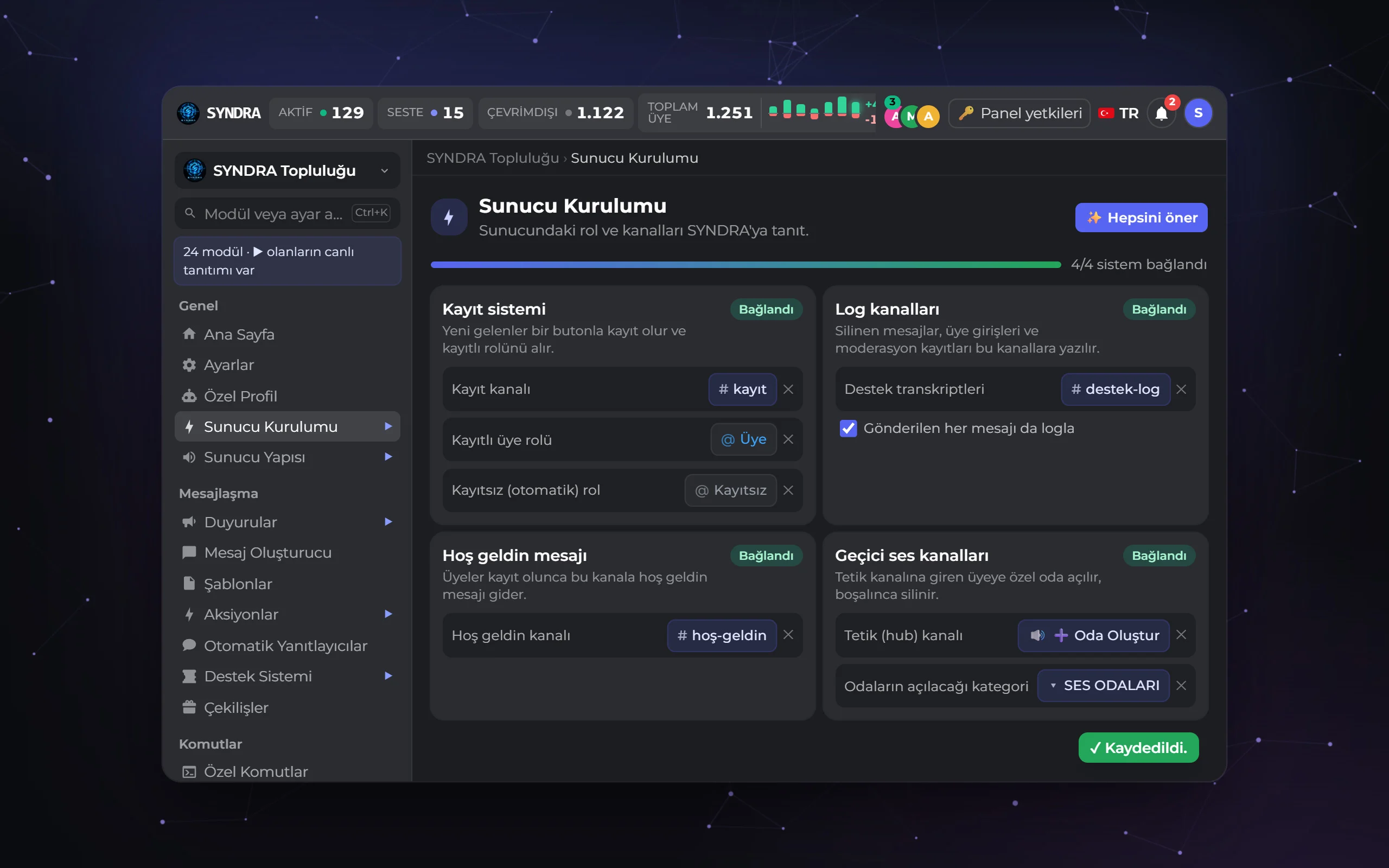
Bringing together the work of several bots also meant thinking about how to manage it as a whole. I developed the web dashboard alongside the bot, creating a place to manage the settings and records behind tasks carried out in Discord.
I adopted the principle that every setting should have one home in the dashboard. I grouped related pages into tabs, pointed menu search to the page containing the setting, and placed each module’s on/off switch in its own page header.
Changing a setting no longer required me to work out which bot’s dashboard to visit first. Dashboard pages also check for changes every three seconds and update without a manual refresh.
A similar shared structure emerged behind the actions themselves. I brought the steps triggered by a button, command, giveaway or member event into the same Actions engine, making operations such as assigning roles, sending messages and waiting reusable across features.
These decisions expanded the scope of the project. The tool I had started for my own server became a bot and dashboard with a common structure for finding settings and carrying out tasks.
3. When did it become a commercial project?
Friends who saw SYNDRA wanted to use it on their own servers. That request meant thinking beyond the needs of my own server during development: each server could have a different channel structure, set of roles and staff team.
In a product used across multiple servers, those differences needed to be managed separately. Server-specific settings and access permissions in the dashboard were part of the technical foundation for my decision to develop SYNDRA commercially.
On 1 October 2026, I published the Free, Medium, High and Max plans on the landing page. On 13 October, I added plan assignment with an end date for each server and a plan badge, making the server’s plan information visible in the dashboard as well.
Purchases begin with a request form. It reaches me through a Discord direct message and email; payment is not yet collected automatically.
4. What does it bring together on a server today?
As far as I know, no other bot brings this entire combination of SYNDRA features together under one roof. For me, the value of that combination is being able to move between server setup, everyday management and community activities within the same bot and dashboard.
That structure begins with setup. The system recognises existing channels and roles by name and suggests matches; nothing changes until the setup is saved. Channel structure, roles and channel permissions can then be edited through the dashboard.
For a new member, automatic roles, button-based registration and an illustrated welcome message can be prepared in the same system. The welcome card’s visual editor supports avatar, text and image layers, while variables in the message are filled with the member’s information.
Members can select roles through buttons, menus or emoji reactions. Chat and voice activity contribute to the level system; temporary voice rooms provide controls for locks, visibility, user limits and ownership.
For everyday moderation, warnings, timeouts, kicks and bans are recorded as numbered cases, and punishments can be reversed from the dashboard. An archive of deleted and edited messages, alongside member, voice, role and channel event logs, provides a place to review what happened afterwards.
Support requests can open private channels, be handed over to senior staff and receive replies from the dashboard. Open/close logs, a live feed and a support board that updates itself in Discord make it possible to follow the progress of a ticket.
A shared permission model determines who can carry out this work. Below the platform and server owners, the dashboard has four moderator levels and guest access; even Level 4, the highest moderator level, cannot grant permissions to others.
Access can be time-limited, linked to a Discord role or adjusted for an individual; a denial takes precedence over an allowance in personal overrides. Commands also support permissions by role, user and channel: a command used in the wrong channel shows the permitted channels, while a lack of permission receives a separate explanation.
Custom slash and prefix commands, keyword replies, giveaways and polls are part of the same bot. For recurring tasks, Actions can connect events such as a member joining or a button being pressed to steps that assign roles, send messages or direct messages, and wait.
Announcements can be prepared in the visual message editor, scheduled or made recurring. Invite tracking and message, voice and member statistics provide a way to follow how this activity is reflected across the server.
5. Will it be possible to manage a server by messaging the bot?
SYNDRA AI is in development and not yet available.
A shared dashboard gives settings a consistent place; with SYNDRA AI, my goal is to let staff write the task directly. I want a staff member to be able to send a request in Turkish or English to @SYNDRA in a Discord staff channel, or through the dashboard’s AI text chat.
For example, the aim is to change a channel’s slow mode or prepare an announcement with a button without opening the relevant settings page, using a shortcut or remembering command syntax. Permissions and room or channel setup are also within the scope I want to manage through written messages.
In the planned workflow, the bot will respond by showing its proposed changes step by step. The operations will be applied after staff approval, logged and kept reversible, so the effect of a written request can be reviewed before anything changes on the server.
The current preview on the site only plays sample scenarios. Typed text is not sent anywhere or processed, and the demo does not perform operations on a server.
6. How did development progress?
The first commit, dated 18 September 2026, already contained the bot core, web dashboard and basic features. From the beginning, I was developing a system in which the Discord side and the management interface worked together.
On 24 September, I opened the dashboard to the internet through Cloudflare Tunnel. That day I added the English dashboard and landing page, and documented a review covering architecture, features, security, performance, the database, the interface and tests in 13 reports.
One significant change during this period concerned when a task submitted through the dashboard reached the bot. In the first design, dashboard requests were written to a queue table that the bot checked periodically; sending a message meant waiting for the next check.
On 25 September, I made database notifications the primary method. The bot began receiving a notification when new work was available, while periodic polling remained as a fallback.
The project note dated 25 September 2026 recorded no more than 0.6 seconds between the dashboard’s “send now” action and the message reaching Discord. The previous design took 5–10 seconds.
SYNDRA project status note · 25 September 2026
Managing outages was also part of development. I built SYNDRA Kontrol on 24 September; on 30 September I added an always-on mode that automatically restarts services that stop unexpectedly.
On 12 October, I made outages caused by power cuts, freezes and Windows restarts appear in problem records, dashboard notifications and the public status page. The admin interface also gained views of uptime over 7, 30 and 365 days.
A role-order check I added on 13 October stopped the bot from attempting to assign roles above its own; if the bot’s role is not high enough, dashboard pages show a warning. On 17 October, I added tunnel recovery: it reconnects automatically after an internet interruption and retries every three minutes if the tunnel has closed.
7. Which languages and technical methods did I use?
I developed the project in TypeScript end to end. The code is kept in one repository as bot, web dashboard and shared database packages within a pnpm workspace, allowing changes to the data structure and the two applications using it to be managed together.
The bot uses Node.js and discord.js 14. The dashboard is built with Next.js 15, React 18 and Tailwind CSS 3; Prisma 5 manages the shared PostgreSQL schema and its migrations.
I did not build a direct HTTP API between the bot and dashboard; both applications use the same PostgreSQL database. The request written by the dashboard and the record processed by the bot therefore live in the same place, while a LISTEN/NOTIFY notification from a database trigger alerts the bot to new work.
In this arrangement, the database holds the work record and the notification signals its arrival. The bot listens for the syndra_wake notification; keeping periodic polling as a fallback provides a second way to check alongside the notification mechanism.
Dashboard sign-in uses Discord OAuth2 through Auth.js. Every API endpoint and server-side action begins with a permission check, and every record queried by ID is also filtered to the relevant Discord server.
That boundary is checked in tests as well: attempts to access another server’s endpoints are rejected with a 401 or 403 response. Having a signed-in session therefore does not grant access to another server’s data.
Inputs and settings are validated with zod; uploads are checked by file signature and limited to 5 MB. Request-origin checks and headers that prevent another site from embedding the page in a frame are also part of the web security controls.
Level and welcome cards are rendered on the server with @napi-rs/canvas. A level card can use the member’s banner as its background; its accent colour is taken from the avatar’s dominant colour and adjusted for readability against the dark background.
Validation includes TypeScript checks, ESLint, unit tests and integration tests that exercise the database. Integration tests run against a separate test database, and the test script refuses to run against the live database.
Concurrent operations are checked too. In the test documented in the audit report, eight simultaneous permission-grant requests produced one record without an error; end-to-end flows with Playwright and accessibility checks with axe are also included in the test coverage.
On every push, GitHub Actions automatically runs dependency installation, Prisma generation, type checking, unit tests, database migrations, bot integration tests and the production build. There is also a test workflow for live commands on a separate Discord test server, along with load and soak test scripts.
The dashboard runs on my own Windows computer and is published over HTTPS through Cloudflare Tunnel. The web server and PostgreSQL listen only on the local address, and secret settings are stored encrypted with Windows DPAPI.
Alongside its setup wizard, SYNDRA Kontrol brings starting, stopping and restarting the database, bot, dashboard and tunnel together with their logs in one application. It completes the monitoring and maintenance side of a project that began with keeping track of scattered bots on my own server.
If you are considering a custom bot or management dashboard for your community or team, you can reach me through the contact form.